
Batch Tasks
Batch Tasks
Overview
Batch tasks automatically run batch operations, executed sequentially at 5 AM every day, and can also be triggered manually. They import data from a local file or a remote URL into the system in bulk. Currently supported types are adding IP whitelist, IP blacklist, importing into an IP Group, and adding sensitive words.
Tips
If the IPs you maintain need to take effect on multiple websites, prefer "Import into IP Group" over importing directly into one website's block/allow list: one source feeds one group, every website referencing that group takes effect at the same time, and you only maintain a single task when the source changes. See Import into IP Group.
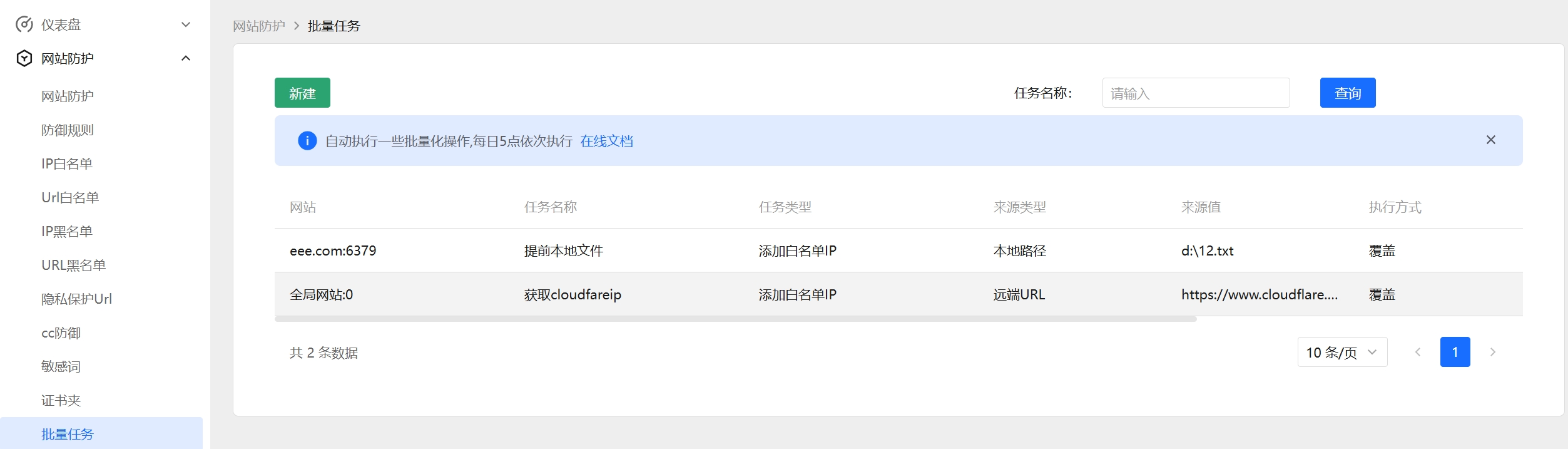
Steps
1. Create a Batch Task
Click the "New" button at the top left to open the dialog.
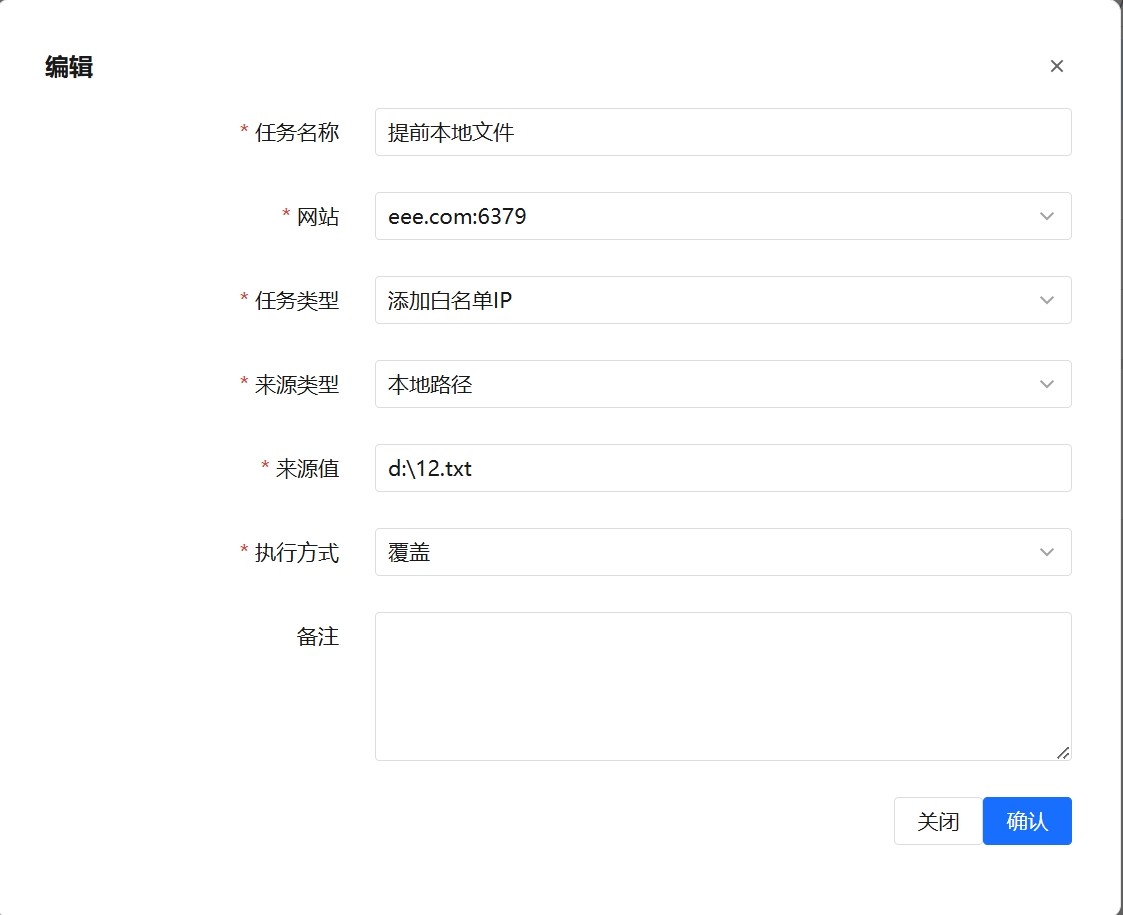
2. Fill in the Task Information
Fill in the Task Name, Website, Task Type, Extra Config, Source Type, Source Value, Execution Method, Trigger Type, and Remarks.
- When you select a different Task Type, the Extra Config field is auto-filled with the corresponding default JSON template (only the Sensitive Words type needs extra config; IP types can use
{}). - The form changes when the Task Type is "Import into IP Group": since an IP group belongs to no website, the Website and Extra Config fields are hidden and a "Target IP Group" dropdown appears instead — pick the group to import into.
- When the Source Type is "Local Path", enter a local file path on the server; when it is "Remote URL", enter an accessible http(s) address.
Click "Confirm" to save.
3. Manual Trigger
Click "Manual Trigger" on a row and confirm to run the batch task immediately, without waiting for the daily schedule.
4. Edit and Delete
- Click "Edit" to modify an existing batch task.
- Click "Delete" and confirm to remove the task.
Import into IP Group
An IP Group is an IP set reusable across websites. With this task type, IPs from the source are imported into the selected IP group, and every website referencing that group (including the global website) and every protection rule take effect at the same time — no need for one task per website.
Typical use: turn a threat-intelligence feed or a corporate egress IP list into a scheduled task that syncs into an IP group daily, then have each website's block/allow list reference that group.
Differences from the other task types:
- Not bound to a website: there is no Website field; you pick a "Target IP Group" instead. If no suitable group exists yet, click New IP Group next to the dropdown, fill in a group name and remarks, and save — the new group is selected automatically without leaving the task form you are filling in.
- Execution Method "Overwrite" means full sync: after the import, IPs that no longer exist in this source are deleted from the group, keeping the group identical to the source — IPs removed upstream disappear from the group automatically. For the other task types, "Overwrite" only updates and never deletes.
- Catch-all patterns such as
*.*.*.*in the source are skipped, matching the restriction for manual IP group entries (see IP Group - Supported IP syntax).
Warning
Because "Overwrite" deletes data, three safeguards apply. If any one of them is not met, no deletion happens at all and the group is left untouched:
- The Execution Method must be "Overwrite" ("Append" never removes anything);
- The source must be read completely (nothing is deleted if reading fails midway);
- The source must contain at least one valid IP (nothing is deleted for an empty file or a remote 404 page).
If the remote URL is unreachable or returns a non-200 status, the task ends immediately and no data is deleted either.
In the task list, the first column of an IP group task shows a tag with the target group name and its current entry count instead of a website.
Field Reference
| Field | Description |
|---|---|
| Task Name | A custom name for the task (required) |
| Website | The website the task applies to, selected from the dropdown (required; hidden and not needed when the Task Type is "Import into IP Group") |
| Task Type | Add IP Whitelist / Add IP Blacklist / Import into IP Group / Add Sensitive Words (required) |
| Target IP Group | Only shown for the "Import into IP Group" type; the IP group to import into (required). The dropdown shows "group name (entry count)"; the "New IP Group" link next to it creates a group in place and selects it automatically, and "Manage IP Groups" jumps to the IP Group page |
| Extra Config | Extra configuration in JSON format. The Sensitive Words type supports check_direction (detection direction: in / out / all) and action (action after detection: deny / replace); IP types need no config ({}); for "Import into IP Group" this is managed by the Target IP Group dropdown and the field is hidden |
| Source Type | Local Path / Remote URL (required) |
| Source Value | A local file path for Local Path, or an http(s) address for Remote URL (required) |
| Source Content Format | One entry per line. IP tasks accept a single IP, CIDR, wildcard (e.g. 10.10.*.*) and range (e.g. 1.2.3.4-1.2.3.99) — the same syntax as manual block/allow list entries. Unrecognized lines are skipped |
| Execution Method | Append (skip existing entries, add only new ones) / Overwrite (required). The meaning of "Overwrite" depends on the task type: for IP block/allow lists and sensitive words it updates existing entries and inserts missing ones without deleting anything; for "Import into IP Group" it is a full sync that removes group entries no longer present in the source |
| Trigger Type | Scheduled Task (runs on the daily schedule) / Manual Task (manual trigger only) (required) |
| Remarks | Optional additional notes |
FAQ
- The extra config cannot be saved? Extra Config must be valid JSON; check that brackets and quotes are complete.
- When do scheduled tasks run? Batch tasks with Trigger Type "Scheduled Task" run sequentially at 5 AM every day; use "Manual Trigger" to run immediately.
- The "Target IP Group" dropdown is empty? No IP group has been created yet. Click New IP Group next to the dropdown to create one in place, or create it on the Website Protection → IP Group page.
- I chose "Overwrite" but stale IPs were not removed from the group? One of the safeguards above kicked in: reading the source failed midway, or the source contained no valid IP. The group is left as-is; check that the source file/URL is healthy.
- Do I need to restart or re-save the websites after importing into an IP group? No. Group changes take effect immediately on every website referencing the group.